9 Best Language Detector APIs in 2026: Features, Pricing, and Real Use Cases

Discover the best language detector APIs of 2026: 1. Detect Language API (SkyCraft) 2. Language Detector (FlintAPIs) 3. Google Cloud Translation 4. Detectlanguage.com and more, with exact pricing and real use cases.

Author: Aditi Upadhyay

Published: 2026-07-15T00:00:00.000Z

Updated: 2026-07-15T14:36:13.227Z

Categories:Audio & Speech
Tags:Language detectionSpeech to text

Your support inbox just got a ticket in Portuguese. Then one in Finnish. Then something that might be Estonian, or maybe Finnish again.


You can't route them, translate them, or even tag them until you know what language you're looking at. That is the exact problem a language detector API solves. It reads a piece of text and tells you the language, usually with a confidence score attached.


In this guide, we compare 9 of the best options for 2026, with verified pricing and real use cases for each one.


The 9 best language detector APIs we cover:

  1. Detect Language API by SkyCraft
  2. Language Detector by FlintAPIs
  3. Google Cloud Translation API
  4. Detectlanguage.com
  5. Chrome Built-in Language Detector API
  6. Languagelayer API
  7. Amazon Comprehend
  8. Azure AI Language
  9. NLP Cloud Language Detection API


Language Detector API: Why You Need One


Language detection comes before everything else


Think about any multilingual workflow you've ever built. Translation, content moderation, support routing, spam filtering. Every single one starts with the same question: what language is this text in?


Get that first step wrong and everything downstream breaks. A Spanish ticket lands with your German support team. Your translation engine tries to translate Finnish as Estonian. Your moderation rules for English run against Arabic text and miss everything.


A language detection API handles that first step for you. You send text, it returns a language code (usually an ISO 639 code like "en" or "de") plus a confidence score between 0 and 1. Your code takes it from there.


What to look for in a language detection API


Not all detection services work the same way. Before you pick one, check these five things:


  • Confidence scores: does the API tell you how sure it is? A ranked list of candidates helps you handle borderline cases.
  • Language coverage: services on this list range from 22 languages to 216. Match the coverage to your actual users.
  • Short-text accuracy: single words and short phrases trip up most detectors. If you process chat messages, test with short inputs first.
  • Batch support: sending 10,000 texts one at a time gets slow and expensive. Batch endpoints fix that.
  • Pricing model: some charge per request, some per character, some per unit. The same workload can cost wildly different amounts across providers.


Top 9 Language Detector APIs of 2026


We put this list together after digging through the docs and pricing pages of every major provider. Cloud giants, dedicated detection services, and browser-native options all made the cut.


1. Detect Language API by SkyCraft


The Detect Language API on API.market identifies the language of any text and returns a ranked list of candidate languages, each with its own confidence score. It supports 22 languages and runs on a single GET request, which makes it one of the fastest APIs to integrate on this list.


Key Features:


  • Returns a full ranked list of candidate languages, not just the top match
  • Numeric confidence score from 0 to 1 for every candidate
  • Covers 22 popular and regional languages
  • Single GET endpoint with one query parameter and your API key
  • Clean JSON response that parses in one line of code


Here is what a real call looks like:


curl -X 'GET' \

 'https://prod.api.market/api/v1/apileague/detect-language/detect-language?text=Das%20ist%20ein%20Text.' \

 -H 'accept: application/json' \

 -H 'x-api-market-key: <your_api_key>'


And the response comes back as a ranked list:

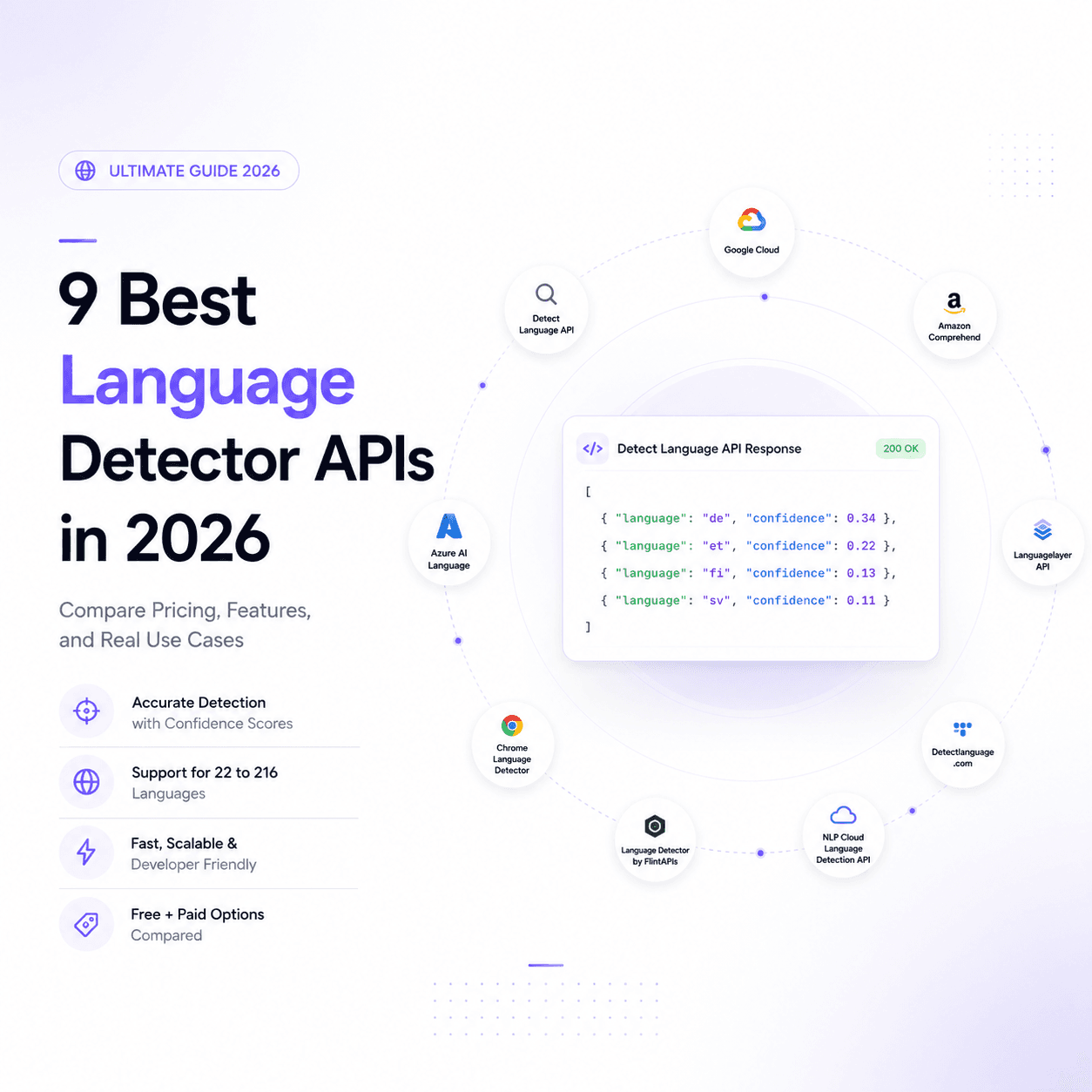
[

  { "language": "de", "confidence": 0.34 },

  { "language": "et", "confidence": 0.22 },

  { "language": "fi", "confidence": 0.13 },

  { "language": "sv", "confidence": 0.11 }

]


That ranked list matters more than you might think. Closely related languages like Estonian and Finnish often score near each other, and having the full list lets your code handle those borderline cases instead of blindly trusting a single answer.


Pricing: The free trial gives you 1,500 API units for 7 days with no credit card needed. After that, the Pro plan is $7.00 per month and includes 15,000 API units. Extra usage beyond your plan costs $0.0060 per API unit.


Real Use Cases:


Say you run a content localization pipeline for a SaaS product. User feedback comes in from all over the world, and each piece needs to reach the right translator. You call the Detect Language API on every submission, read the top candidate, and route German feedback to your German translation queue and Spanish feedback to your Spanish one. No human sorting, no misrouted content.


Or picture an analytics team tracking a brand across social media. They pull thousands of mentions a day and want to know which markets are talking. Running each mention through the API gives them a language tag per post, and suddenly they can chart brand conversation by language over time. That report went from impossible to automatic.


2. Language Detector by FlintAPIs


The Language Detector by FlintAPIs, also on API.market, detects 73+ languages and returns a confidence score for every detection. It stands out for its flexibility: you can limit detection to a specific subset of languages, switch on a low-accuracy mode when speed matters more than precision, and process longer texts asynchronously.


Key Features:


  • Detects 73+ languages, from major world languages to regional ones
  • Confidence value from 0 to 1 on every result
  • Optional target-language subsets, so you only test against languages you care about
  • Low-accuracy mode that trades precision for raw speed
  • Async processing that handles longer documents without timeouts


Pricing: The free tier includes 200 API calls per month with no payment details required. Paid plans start at $8 per month, and you can review the full plan lineup on the API.market listing before you subscribe.


Real Use Cases:


Imagine a multilingual customer support desk for an e-commerce company selling across Europe. Tickets arrive in a dozen languages. The support platform calls the Language Detector on every new ticket and routes each one to the agent team that speaks that language. Response times drop because nobody wastes time forwarding tickets around.


Now think about content moderation on a community platform. Your moderation rules differ by language, and your English profanity filter does nothing against Turkish text. Detecting language first means each post goes through the right filter set. The subset feature helps here too: if your platform only supports 8 languages, you limit detection to those 8 and get faster, more reliable results.


3. Google Cloud Translation API


Google's Cloud Translation API includes a detect method that identifies over 100 languages. The v3 version returns a confidence score and can list multiple ranked candidates, which puts it on par with dedicated detection services for output quality.


Key Features:


  • Detects over 100 languages with strong accuracy on longer text
  • v3 API returns confidence scores and multiple ranked candidates
  • Works best with 20 or more characters of input
  • Detection is free when bundled with a translation call
  • Backed by Google's infrastructure and SLAs


Pricing: Translation costs $20 per million characters, and your first 500,000 characters each month are free. If you detect language as part of a translation request, the detection itself adds no extra charge.


Real Use Cases:


A news aggregator pulls articles from hundreds of international sources and needs everything in English. Detection and translation happen in one call per article, so the pipeline stays simple and detection costs nothing extra.


A global form-processing tool takes user submissions in any language. It detects the language first, then decides whether translation is needed at all. English submissions skip the translation step entirely, which cuts the bill.


4. Detectlanguage.com


Detectlanguage.com is a dedicated language detection service, and it covers 216 languages, the widest range on this list. It also handles short phrases and single words better than most competitors, which makes it a strong pick for chat and search-query workloads.


Key Features:


  • Detects 216 languages, the broadest coverage we found anywhere
  • Handles long texts, short phrases, and single words
  • Batch detection endpoint for bulk processing
  • Official SDKs for Ruby, Python, Node.js, Go, Java, PHP, and .NET
  • Low latency servers across multiple regions


Pricing: The free plan allows 1,000 requests per day with a 1 MB daily data cap. The Basic plan is $5 per month for 100,000 requests per day, Plus is $15 per month for 1 million requests per day, and Premium is $40 per month for 10 million requests per day.


Real Use Cases:


A dataset team preparing training data for a machine learning project needs to sort 40 million short text snippets by language. The batch endpoint plus the Premium plan handles the whole job in days, not weeks.


A chatbot company supports users in 30 languages, and the first message is often just "hola" or "hi". Because this service handles single words well, the bot picks the right language from the very first message instead of waiting for a longer sentence.


5. Chrome Built-in Language Detector API


Chrome now ships a Language Detector API right inside the browser, powered by Google's Gemini Nano model. It runs entirely on the user's device, so no text ever leaves the browser. If you searched for the language detector API in Chrome built-in AI, this is the one.


Key Features:

  • Runs fully client-side, so user text stays private
  • No API key, no server, no per-request cost
  • Returns a ranked list of detected languages with confidence scores
  • Nearly instant results, even on longer text
  • Pairs with Chrome's built-in Translator API for on-device translation


Pricing: Free. The API ships inside Chrome 138 and later on desktop, and there is nothing to subscribe to.


Real Use Cases:


A web app with user reviews wants to show a "translate this review" button only when the review differs from the reader's language. The page detects each review's language on load, in the browser, at zero cost, and shows the button only where it helps.


A privacy-focused note-taking app wants language-aware spellchecking without sending notes to any server. On-device detection picks the right dictionary while the text never leaves the machine.


One caveat before you commit: this API is experimental and works only in Chrome on desktop. Edge, Firefox, and Safari don't support it, so treat it as an enhancement layer, not your only detection path.


6. Languagelayer API


Languagelayer is a REST JSON API from APILayer that identifies 173 languages. It returns a probability score, a confidence percentage, and a reliable_result flag with every detection, which gives you three different signals to base decisions on.


Key Features:


  • Detects 173 languages through a simple URL-based request
  • Batch endpoint that processes an array of texts in one call
  • Probability score plus confidence percentage on every match
  • A reliable_result flag that tells you when the API is fully certain
  • 256-bit HTTPS on all requests


Pricing: The free plan covers 100 requests per month. The Basic plan is $4.99 per month for 50,000 requests, Professional is $19.99 per month for 500,000 requests, and Enterprise is $39.99 per month for 2 million requests. Yearly billing saves 15 percent.


Real Use Cases:


A small startup building an email sorting tool needs cheap detection at moderate volume. The $4.99 plan covers 50,000 emails per month, which fits a lean budget while the product finds its footing.


An agency running multilingual landing pages checks form submissions against the expected language of each page. Submissions flagged with a low reliable_result get a human review, and the rest flow through automatically.


7. Amazon Comprehend


Amazon Comprehend is AWS's natural language processing service, and its dominant language detection endpoint identifies the main language of any document. Requests are measured in units of 100 characters with a 3-unit minimum per request.


Key Features:


  • Detects 100+ languages through the DetectDominantLanguage endpoint
  • Native integration with S3, Lambda, and the rest of the AWS stack
  • Tiered pricing that drops as your monthly volume grows
  • Batch operations for processing entire document stores
  • IAM-based access control and AWS compliance coverage


Pricing: Standard requests start at $0.0001 per 100-character unit, and the rate decreases at higher monthly volumes. The free tier gives you 50,000 units (5 million characters) per month for your first 12 months on the service.


Real Use Cases:


A legal tech company stores millions of contracts in S3 and needs each one tagged by language before indexing. A Lambda function fires on every upload, calls Comprehend, and writes the language tag to the document's metadata. The whole pipeline lives inside AWS.


A call center platform transcribes calls and pushes the text through Comprehend to detect the caller's language. That tag drives which sentiment model runs next, since sentiment analysis needs language-specific handling to work well.


8. Azure AI Language


Azure AI Language includes language detection as one of its core text analytics features. Usage is counted in text records, where one record covers up to 1,000 characters, and detection shares a free monthly allowance with Azure's other language features.


Key Features:


  • Detects 100+ languages as part of a broader text analytics suite
  • Text-record billing that is easy to predict for fixed-length inputs
  • Shares one free tier with sentiment, key phrases, and summarization
  • Deep integration with Azure Functions, Logic Apps, and Power Platform
  • Enterprise-grade compliance and regional data residency options


Pricing: The free tier includes 5,000 text records per month, shared across several Azure language features. Paid usage runs about $1 per 1,000 text records at lower volumes and drops to around $0.30 per 1,000 records once you pass 2.5 million records per month.


Real Use Cases:


An enterprise HR platform built on Azure processes employee feedback from offices in 40 countries. Detection runs inside an existing Azure Logic App, so adding it took one connector instead of a new vendor contract and security review.


A financial services firm with strict data residency rules keeps all text processing inside its approved Azure region. Language detection happens in the same compliance boundary as everything else, which keeps the auditors happy.


9. NLP Cloud Language Detection API


NLP Cloud offers a language detection API built on Python's LangDetect library, covering 55 languages. Its standout trick is mixed-language detection: send a text that is two-thirds English and one-third French, and it returns both languages with their proportions.


Key Features:


  • Detects 55 languages with solid real-time performance
  • Identifies multiple languages within a single text, with proportions
  • No request logging, with HIPAA and GDPR compliance built in
  • Part of a wider NLP suite covering sentiment, NER, and translation
  • Free testing tier on every endpoint


Pricing: You can test the language detection endpoint for free. Ongoing use runs through NLP Cloud's subscription plans, which bundle detection with the rest of their NLP endpoints, so check their pricing page for the plan that matches your volume.


Real Use Cases:


A healthcare messaging platform needs language detection but cannot send patient text to a service that logs requests. NLP Cloud's no-logging policy and HIPAA compliance clear the legal review that blocked other vendors.


A research team studying code-switching in bilingual communities analyzes social posts that mix Spanish and English mid-sentence. The proportion output shows exactly how much of each post is in each language, which single-answer detectors simply cannot do.


Pricing Overview


Here is the quick version of what each language detection API costs:


  • SkyCraft Detect Language API: $7 per month for 15,000 units, with a 7-day free trial of 1,500 units and no credit card required
  • FlintAPIs Language Detector: from $8 per month, with a free tier of 200 calls per month
  • Google Cloud Translation: $20 per million characters, with 500,000 free characters monthly
  • Detectlanguage.com: from $5 per month, with a free 1,000 requests per day
  • Chrome Built-in Language Detector: completely free inside Chrome 138+ on desktop
  • Languagelayer: from $4.99 per month, with a free 100 requests per month
  • Amazon Comprehend: from $0.0001 per 100-character unit, with 50,000 free units monthly for 12 months
  • Azure AI Language: about $1 per 1,000 text records, with 5,000 free records per month
  • NLP Cloud: free testing tier, then subscription plans that bundle all NLP endpoints


How to Choose a Language Detector API


The right pick depends on what you're building, not on which API has the longest feature list. Ask yourself three questions.

First, where does your code run? If everything happens in the browser and privacy matters, Chrome's built-in API costs nothing.


If you run on AWS or Azure already, the native option saves you a vendor review.


Second, how many languages do you actually need? Most products serve fewer than 25 languages. The SkyCraft Detect Language API covers 22 languages at $7 per month, and you rarely need more. If you do, FlintAPIs covers 73+ and detectlanguage.com goes all the way to 216.


Third, what does your text look like? Short chat messages need a service that handles brief inputs well. Long documents favor per-character pricing. Mixed-language text points you at NLP Cloud.


  • Need the widest coverage: detectlanguage.com with 216 languages
  • Need cheap, simple, ranked confidence scores: SkyCraft on API.market
  • Need 73+ languages with speed options: FlintAPIs on API.market
  • Already on AWS, Azure, or GCP: stay native
  • Client-side only: Chrome built-in Language Detector


Which Language Detector API Wins in 2026?


Every API on this list solves the core problem: text goes in, a language code and confidence score come out. The real differences show up in coverage, pricing, and how much setup each one demands.


For most teams, we recommend starting with the Detect Language API by SkyCraft on API.market. You get ranked candidates with confidence scores, a single GET endpoint, and a 7-day trial with 1,500 free units and no credit card. At $7 per month for 15,000 units, it undercuts the cloud giants for small and mid-size workloads.


If your product spans more languages, the Language Detector by FlintAPIs covers 73+ of them, adds subset detection and a speed mode, and starts free at 200 calls per month.


Both run on API.market, which means one account, one API key format, and a built-in playground where you can test either API before writing a single line of code.


FAQs About Language Detector APIs


Q1. What is a language detector API?


A language detector API is a web service that analyzes text and returns the language it is written in, usually as an ISO 639 code like "en" or "de" along with a confidence score. Developers use it to route support tickets, prepare text for translation, moderate multilingual content, and label user-generated posts automatically.


Q2. Is there a free language detection API?


Yes, several options cost nothing to start. Chrome's built-in Language Detector API is completely free and runs inside the browser. Detectlanguage.com offers 1,000 free requests per day. On API.market, the SkyCraft Detect Language API includes a 7-day free trial with 1,500 units, and FlintAPIs gives you 200 free calls every month.


Q3. How accurate are language detection APIs?


Language detection APIs are highly accurate on text longer than 20 characters, but accuracy drops on single words and short phrases. Closely related languages like Norwegian and Danish, or Estonian and Finnish, cause the most confusion. Check the confidence score on every result and treat low-confidence detections as unknown rather than trusting them blindly.

9 Best Language Detector APIs in 2026: Features, Pricing, and Real Use Cases

Discover the best language detector APIs of 2026: 1. Detect Language API (SkyCraft) 2. Language Detector (FlintAPIs) 3. Google Cloud Translation 4. Detectlanguage.com and more, with exact pricing and real use cases.
9 Best Language Detector APIs in 2026: Features, Pricing, and Real Use Cases

Your support inbox just got a ticket in Portuguese. Then one in Finnish. Then something that might be Estonian, or maybe Finnish again.

You can't route them, translate them, or even tag them until you know what language you're looking at. That is the exact problem a language detector API solves. It reads a piece of text and tells you the language, usually with a confidence score attached.

In this guide, we compare 9 of the best options for 2026, with verified pricing and real use cases for each one.

The 9 best language detector APIs we cover:

  1. Detect Language API by SkyCraft
  2. Language Detector by FlintAPIs
  3. Google Cloud Translation API
  4. Detectlanguage.com
  5. Chrome Built-in Language Detector API
  6. Languagelayer API
  7. Amazon Comprehend
  8. Azure AI Language
  9. NLP Cloud Language Detection API

Language Detector API: Why You Need One

Language detection comes before everything else

Think about any multilingual workflow you've ever built. Translation, content moderation, support routing, spam filtering. Every single one starts with the same question: what language is this text in?

Get that first step wrong and everything downstream breaks. A Spanish ticket lands with your German support team. Your translation engine tries to translate Finnish as Estonian. Your moderation rules for English run against Arabic text and miss everything.

A language detection API handles that first step for you. You send text, it returns a language code (usually an ISO 639 code like "en" or "de") plus a confidence score between 0 and 1. Your code takes it from there.

What to look for in a language detection API

Not all detection services work the same way. Before you pick one, check these five things:

  • Confidence scores: does the API tell you how sure it is? A ranked list of candidates helps you handle borderline cases.
  • Language coverage: services on this list range from 22 languages to 216. Match the coverage to your actual users.
  • Short-text accuracy: single words and short phrases trip up most detectors. If you process chat messages, test with short inputs first.
  • Batch support: sending 10,000 texts one at a time gets slow and expensive. Batch endpoints fix that.
  • Pricing model: some charge per request, some per character, some per unit. The same workload can cost wildly different amounts across providers.

Top 9 Language Detector APIs of 2026

We put this list together after digging through the docs and pricing pages of every major provider. Cloud giants, dedicated detection services, and browser-native options all made the cut.

1. Detect Language API by SkyCraft

The Detect Language API on API.market identifies the language of any text and returns a ranked list of candidate languages, each with its own confidence score. It supports 22 languages and runs on a single GET request, which makes it one of the fastest APIs to integrate on this list.

Key Features:

  • Returns a full ranked list of candidate languages, not just the top match
  • Numeric confidence score from 0 to 1 for every candidate
  • Covers 22 popular and regional languages
  • Single GET endpoint with one query parameter and your API key
  • Clean JSON response that parses in one line of code

Here is what a real call looks like:

curl -X 'GET' \

 'https://prod.api.market/api/v1/apileague/detect-language/detect-language?text=Das%20ist%20ein%20Text.' \

 -H 'accept: application/json' \

 -H 'x-api-market-key: <your_api_key>'

And the response comes back as a ranked list:

[

  { "language": "de", "confidence": 0.34 },

  { "language": "et", "confidence": 0.22 },

  { "language": "fi", "confidence": 0.13 },

  { "language": "sv", "confidence": 0.11 }

]

That ranked list matters more than you might think. Closely related languages like Estonian and Finnish often score near each other, and having the full list lets your code handle those borderline cases instead of blindly trusting a single answer.

Pricing: The free trial gives you 1,500 API units for 7 days with no credit card needed. After that, the Pro plan is $7.00 per month and includes 15,000 API units. Extra usage beyond your plan costs $0.0060 per API unit.

Real Use Cases:

Say you run a content localization pipeline for a SaaS product. User feedback comes in from all over the world, and each piece needs to reach the right translator. You call the Detect Language API on every submission, read the top candidate, and route German feedback to your German translation queue and Spanish feedback to your Spanish one. No human sorting, no misrouted content.

Or picture an analytics team tracking a brand across social media. They pull thousands of mentions a day and want to know which markets are talking. Running each mention through the API gives them a language tag per post, and suddenly they can chart brand conversation by language over time. That report went from impossible to automatic.

2. Language Detector by FlintAPIs

The Language Detector by FlintAPIs, also on API.market, detects 73+ languages and returns a confidence score for every detection. It stands out for its flexibility: you can limit detection to a specific subset of languages, switch on a low-accuracy mode when speed matters more than precision, and process longer texts asynchronously.

Key Features:

  • Detects 73+ languages, from major world languages to regional ones
  • Confidence value from 0 to 1 on every result
  • Optional target-language subsets, so you only test against languages you care about
  • Low-accuracy mode that trades precision for raw speed
  • Async processing that handles longer documents without timeouts

Pricing: The free tier includes 200 API calls per month with no payment details required. Paid plans start at $8 per month, and you can review the full plan lineup on the API.market listing before you subscribe.

Real Use Cases:

Imagine a multilingual customer support desk for an e-commerce company selling across Europe. Tickets arrive in a dozen languages. The support platform calls the Language Detector on every new ticket and routes each one to the agent team that speaks that language. Response times drop because nobody wastes time forwarding tickets around.

Now think about content moderation on a community platform. Your moderation rules differ by language, and your English profanity filter does nothing against Turkish text. Detecting language first means each post goes through the right filter set. The subset feature helps here too: if your platform only supports 8 languages, you limit detection to those 8 and get faster, more reliable results.

3. Google Cloud Translation API

Google's Cloud Translation API includes a detect method that identifies over 100 languages. The v3 version returns a confidence score and can list multiple ranked candidates, which puts it on par with dedicated detection services for output quality.

Key Features:

  • Detects over 100 languages with strong accuracy on longer text
  • v3 API returns confidence scores and multiple ranked candidates
  • Works best with 20 or more characters of input
  • Detection is free when bundled with a translation call
  • Backed by Google's infrastructure and SLAs

Pricing: Translation costs $20 per million characters, and your first 500,000 characters each month are free. If you detect language as part of a translation request, the detection itself adds no extra charge.

Real Use Cases:

A news aggregator pulls articles from hundreds of international sources and needs everything in English. Detection and translation happen in one call per article, so the pipeline stays simple and detection costs nothing extra.

A global form-processing tool takes user submissions in any language. It detects the language first, then decides whether translation is needed at all. English submissions skip the translation step entirely, which cuts the bill.

4. Detectlanguage.com

Detectlanguage.com is a dedicated language detection service, and it covers 216 languages, the widest range on this list. It also handles short phrases and single words better than most competitors, which makes it a strong pick for chat and search-query workloads.

Key Features:

  • Detects 216 languages, the broadest coverage we found anywhere
  • Handles long texts, short phrases, and single words
  • Batch detection endpoint for bulk processing
  • Official SDKs for Ruby, Python, Node.js, Go, Java, PHP, and .NET
  • Low latency servers across multiple regions

Pricing: The free plan allows 1,000 requests per day with a 1 MB daily data cap. The Basic plan is $5 per month for 100,000 requests per day, Plus is $15 per month for 1 million requests per day, and Premium is $40 per month for 10 million requests per day.

Real Use Cases:

A dataset team preparing training data for a machine learning project needs to sort 40 million short text snippets by language. The batch endpoint plus the Premium plan handles the whole job in days, not weeks.

A chatbot company supports users in 30 languages, and the first message is often just "hola" or "hi". Because this service handles single words well, the bot picks the right language from the very first message instead of waiting for a longer sentence.

5. Chrome Built-in Language Detector API

Chrome now ships a Language Detector API right inside the browser, powered by Google's Gemini Nano model. It runs entirely on the user's device, so no text ever leaves the browser. If you searched for the language detector API in Chrome built-in AI, this is the one.

Key Features:

  • Runs fully client-side, so user text stays private
  • No API key, no server, no per-request cost
  • Returns a ranked list of detected languages with confidence scores
  • Nearly instant results, even on longer text
  • Pairs with Chrome's built-in Translator API for on-device translation

Pricing: Free. The API ships inside Chrome 138 and later on desktop, and there is nothing to subscribe to.

Real Use Cases:

A web app with user reviews wants to show a "translate this review" button only when the review differs from the reader's language. The page detects each review's language on load, in the browser, at zero cost, and shows the button only where it helps.

A privacy-focused note-taking app wants language-aware spellchecking without sending notes to any server. On-device detection picks the right dictionary while the text never leaves the machine.

One caveat before you commit: this API is experimental and works only in Chrome on desktop. Edge, Firefox, and Safari don't support it, so treat it as an enhancement layer, not your only detection path.

6. Languagelayer API

Languagelayer is a REST JSON API from APILayer that identifies 173 languages. It returns a probability score, a confidence percentage, and a reliable_result flag with every detection, which gives you three different signals to base decisions on.

Key Features:

  • Detects 173 languages through a simple URL-based request
  • Batch endpoint that processes an array of texts in one call
  • Probability score plus confidence percentage on every match
  • A reliable_result flag that tells you when the API is fully certain
  • 256-bit HTTPS on all requests

Pricing: The free plan covers 100 requests per month. The Basic plan is $4.99 per month for 50,000 requests, Professional is $19.99 per month for 500,000 requests, and Enterprise is $39.99 per month for 2 million requests. Yearly billing saves 15 percent.

Real Use Cases:

A small startup building an email sorting tool needs cheap detection at moderate volume. The $4.99 plan covers 50,000 emails per month, which fits a lean budget while the product finds its footing.

An agency running multilingual landing pages checks form submissions against the expected language of each page. Submissions flagged with a low reliable_result get a human review, and the rest flow through automatically.

7. Amazon Comprehend

Amazon Comprehend is AWS's natural language processing service, and its dominant language detection endpoint identifies the main language of any document. Requests are measured in units of 100 characters with a 3-unit minimum per request.

Key Features:

  • Detects 100+ languages through the DetectDominantLanguage endpoint
  • Native integration with S3, Lambda, and the rest of the AWS stack
  • Tiered pricing that drops as your monthly volume grows
  • Batch operations for processing entire document stores
  • IAM-based access control and AWS compliance coverage

Pricing: Standard requests start at $0.0001 per 100-character unit, and the rate decreases at higher monthly volumes. The free tier gives you 50,000 units (5 million characters) per month for your first 12 months on the service.

Real Use Cases:

A legal tech company stores millions of contracts in S3 and needs each one tagged by language before indexing. A Lambda function fires on every upload, calls Comprehend, and writes the language tag to the document's metadata. The whole pipeline lives inside AWS.

A call center platform transcribes calls and pushes the text through Comprehend to detect the caller's language. That tag drives which sentiment model runs next, since sentiment analysis needs language-specific handling to work well.

8. Azure AI Language

Azure AI Language includes language detection as one of its core text analytics features. Usage is counted in text records, where one record covers up to 1,000 characters, and detection shares a free monthly allowance with Azure's other language features.

Key Features:

  • Detects 100+ languages as part of a broader text analytics suite
  • Text-record billing that is easy to predict for fixed-length inputs
  • Shares one free tier with sentiment, key phrases, and summarization
  • Deep integration with Azure Functions, Logic Apps, and Power Platform
  • Enterprise-grade compliance and regional data residency options

Pricing: The free tier includes 5,000 text records per month, shared across several Azure language features. Paid usage runs about $1 per 1,000 text records at lower volumes and drops to around $0.30 per 1,000 records once you pass 2.5 million records per month.

Real Use Cases:

An enterprise HR platform built on Azure processes employee feedback from offices in 40 countries. Detection runs inside an existing Azure Logic App, so adding it took one connector instead of a new vendor contract and security review.

A financial services firm with strict data residency rules keeps all text processing inside its approved Azure region. Language detection happens in the same compliance boundary as everything else, which keeps the auditors happy.

9. NLP Cloud Language Detection API

NLP Cloud offers a language detection API built on Python's LangDetect library, covering 55 languages. Its standout trick is mixed-language detection: send a text that is two-thirds English and one-third French, and it returns both languages with their proportions.

Key Features:

  • Detects 55 languages with solid real-time performance
  • Identifies multiple languages within a single text, with proportions
  • No request logging, with HIPAA and GDPR compliance built in
  • Part of a wider NLP suite covering sentiment, NER, and translation
  • Free testing tier on every endpoint

Pricing: You can test the language detection endpoint for free. Ongoing use runs through NLP Cloud's subscription plans, which bundle detection with the rest of their NLP endpoints, so check their pricing page for the plan that matches your volume.

Real Use Cases:

A healthcare messaging platform needs language detection but cannot send patient text to a service that logs requests. NLP Cloud's no-logging policy and HIPAA compliance clear the legal review that blocked other vendors.

A research team studying code-switching in bilingual communities analyzes social posts that mix Spanish and English mid-sentence. The proportion output shows exactly how much of each post is in each language, which single-answer detectors simply cannot do.

Pricing Overview

Here is the quick version of what each language detection API costs:

  • SkyCraft Detect Language API: $7 per month for 15,000 units, with a 7-day free trial of 1,500 units and no credit card required
  • FlintAPIs Language Detector: from $8 per month, with a free tier of 200 calls per month
  • Google Cloud Translation: $20 per million characters, with 500,000 free characters monthly
  • Detectlanguage.com: from $5 per month, with a free 1,000 requests per day
  • Chrome Built-in Language Detector: completely free inside Chrome 138+ on desktop
  • Languagelayer: from $4.99 per month, with a free 100 requests per month
  • Amazon Comprehend: from $0.0001 per 100-character unit, with 50,000 free units monthly for 12 months
  • Azure AI Language: about $1 per 1,000 text records, with 5,000 free records per month
  • NLP Cloud: free testing tier, then subscription plans that bundle all NLP endpoints

How to Choose a Language Detector API

The right pick depends on what you're building, not on which API has the longest feature list. Ask yourself three questions.

First, where does your code run? If everything happens in the browser and privacy matters, Chrome's built-in API costs nothing.

If you run on AWS or Azure already, the native option saves you a vendor review.

Second, how many languages do you actually need? Most products serve fewer than 25 languages. The SkyCraft Detect Language API covers 22 languages at $7 per month, and you rarely need more. If you do, FlintAPIs covers 73+ and detectlanguage.com goes all the way to 216.

Third, what does your text look like? Short chat messages need a service that handles brief inputs well. Long documents favor per-character pricing. Mixed-language text points you at NLP Cloud.

  • Need the widest coverage: detectlanguage.com with 216 languages
  • Need cheap, simple, ranked confidence scores: SkyCraft on API.market
  • Need 73+ languages with speed options: FlintAPIs on API.market
  • Already on AWS, Azure, or GCP: stay native
  • Client-side only: Chrome built-in Language Detector

Which Language Detector API Wins in 2026?

Every API on this list solves the core problem: text goes in, a language code and confidence score come out. The real differences show up in coverage, pricing, and how much setup each one demands.

For most teams, we recommend starting with the Detect Language API by SkyCraft on API.market. You get ranked candidates with confidence scores, a single GET endpoint, and a 7-day trial with 1,500 free units and no credit card. At $7 per month for 15,000 units, it undercuts the cloud giants for small and mid-size workloads.

If your product spans more languages, the Language Detector by FlintAPIs covers 73+ of them, adds subset detection and a speed mode, and starts free at 200 calls per month.

Both run on API.market, which means one account, one API key format, and a built-in playground where you can test either API before writing a single line of code.

FAQs About Language Detector APIs

Q1. What is a language detector API?

A language detector API is a web service that analyzes text and returns the language it is written in, usually as an ISO 639 code like "en" or "de" along with a confidence score. Developers use it to route support tickets, prepare text for translation, moderate multilingual content, and label user-generated posts automatically.

Q2. Is there a free language detection API?

Yes, several options cost nothing to start. Chrome's built-in Language Detector API is completely free and runs inside the browser. Detectlanguage.com offers 1,000 free requests per day. On API.market, the SkyCraft Detect Language API includes a 7-day free trial with 1,500 units, and FlintAPIs gives you 200 free calls every month.

Q3. How accurate are language detection APIs?

Language detection APIs are highly accurate on text longer than 20 characters, but accuracy drops on single words and short phrases. Closely related languages like Norwegian and Danish, or Estonian and Finnish, cause the most confusion. Check the confidence score on every result and treat low-confidence detections as unknown rather than trusting them blindly.