Top YouTube Transcript APIs in 2026 That Deliver Reliable and Consistent Results

Here are the top YouTube Transcript APIs you can use in 2026: 1. YouTube Transcriptor by API Market 2.Youtube-transcript-api 3.Supadata Youtube Transcript...

Author: Aditi Upadhyay

Published: 2026-03-27T00:00:00.000Z

Updated: 2026-03-27T12:40:45.373Z

Categories:Artificial IntelligenceVideoEntertainment
Tags:APIsAPIContent CreationSocial MediaDigital Marketing

You've got YouTube videos and you need the text out of them. You want a youtube transcript api that holds up in production, not one that breaks the moment YouTube updates something internally.


Some tools are free but fragile. Others are priced like they think you're running Google. This guide covers the four best options in 2026 so you can stop comparing and just pick the one that fits.


What is a YouTube Transcript API?


A YouTube Transcript API pulls the spoken text out of any YouTube video and returns it as structured data your code can use.


You send a video URL or ID to an endpoint and get back clean readable text, sometimes with a full timestamped breakdown of every spoken segment.


It works with both manually added captions and YouTube's auto-generated ones. So even for videos where the creator never bothered adding subtitles, you can often still pull a full transcript.


How Does It Work?


YouTube stores caption data for most public videos. When auto-captioning runs or a creator uploads a subtitle file, that data lives inside YouTube's internal systems.


A transcript API taps into that data. You pass the video URL with an API key and get back a JSON response with clean text and raw timestamped captions.


Some APIs like Supadata also add an AI layer. If YouTube's native captions don't exist, the AI generates a transcript anyway. For production pipelines on large video libraries, you know that kind of fallback makes a real difference.


Top YouTube Transcript APIs for 2026


1. YouTube Transcriptor Pro by API Market


Start here if you want something that just works. No library installs, no dependency management, no worrying about YouTube changing something internally overnight.


YouTube Transcriptor Pro on API.market takes a video URL and gives you back the full transcript as clean text, plus timestamped caption segments. One endpoint. One API key. One POST request.


What makes it stand out is the billing model. You only get charged when the API returns a successful response. If the call fails or the video has no transcript, nothing gets deducted.


Features:

  • Single POST endpoint (/api/yt-transcript)
  • Returns clean plain text and raw timestamped captions in one response
  • Works with any public YouTube video URL
  • No scraping, no headless browser, no complex configuration
  • API key authentication via x-api-key header
  • Pay only for successful 2XX responses


Pricing:

API.market uses a pay-per-successful-call model. Visit the YouTube Transcriptor Pro page for current plan details.


Ideal for: Developers building AI tools, content repurposing apps, or SEO pipelines that need reliable video-to-text output in production.


2. youtube-transcript-api (Python)


This is the community favourite. Free, open source, and the most searched library in this space by a wide margin.

Run pip install youtube-transcript-api, pass a video ID, and get back caption objects with text, start time, and duration. Current version is 1.2.4, released January 2026, supporting Python 3.8 through 3.14.


Features:

  • Completely free and open source (MIT License)
  • Fetches both manually created and auto-generated captions
  • Multi-language support with fallback options
  • No API key required
  • CLI and Python API interface both available
  • Proxy support for working around IP-based blocks


Pricing:

Free. Open source under the MIT License with no usage limits.


Ideal for: Python developers prototyping a transcript feature and researchers who want to extract subtitles from YouTube videos without paying for a service.


This library relies on undocumented YouTube internals and has broken before when YouTube changed something on their end. For anything production-critical, a managed REST API is a safer long-term bet.


3. Supadata YouTube Transcript API


Supadata is the option you reach for when single-video pulls aren't enough. You can process full playlists, entire channels, and platforms beyond just YouTube.


The AI fallback is what sets it apart. If a video has no native captions, Supadata generates a transcript using its own AI model. No more pipelines hitting a wall because 20% of your queue has no captions.


Features:

  • Multi-language support with language code parameter
  • Timestamped segments on all transcripts
  • Python and JavaScript SDKs
  • AI-generated transcript fallback when native captions are missing
  • Native integrations with Zapier, Make, and n8n
  • Batch processing across playlists and channels


Pricing:

  • Free : 100 credits
  • Starter : ~500 credits from ~$9/month
  • Pro+ β€” Higher volumes, up to $297/month


Ideal for: Teams building multi-platform content pipelines and developers who need AI-backed transcription when YouTube captions aren't available.


4. youtube-transcript.io API


This is a dedicated REST API built specifically for YouTube transcript extraction. It works across any language that can make an HTTP request, so you're not locked into Python.


The channels endpoint is the standout feature. On Plus and Pro plans, you can pull transcript data across an entire YouTube channel in one go. Genuinely useful for competitive research and content audits at scale.


Features:

  • POST endpoint at https://www.youtube-transcript.io/api/transcripts
  • Channels endpoint for bulk processing (Plus and Pro plans)
  • Rate limit: 5 requests per 10 seconds
  • Basic auth with API token
  • Integrates with 400+ apps through n8n automation
  • Handles both auto-generated and manually created captions


Pricing:

  • Free: 1,000 transcripts @ $9.99/month
  • Pro: 3,000 transcripts @ $24.99/month
  • Pro+: 6,000 transcripts @ $47.99/month
  • Pro Max: 10,000 transcripts @ $79.99/month
  • Custom: 10,000+ transcripts @ Contact for pricing


Ideal for: Developers who want a REST API without Python lock-in and teams doing bulk channel-level extraction.


Comparison at a Glance


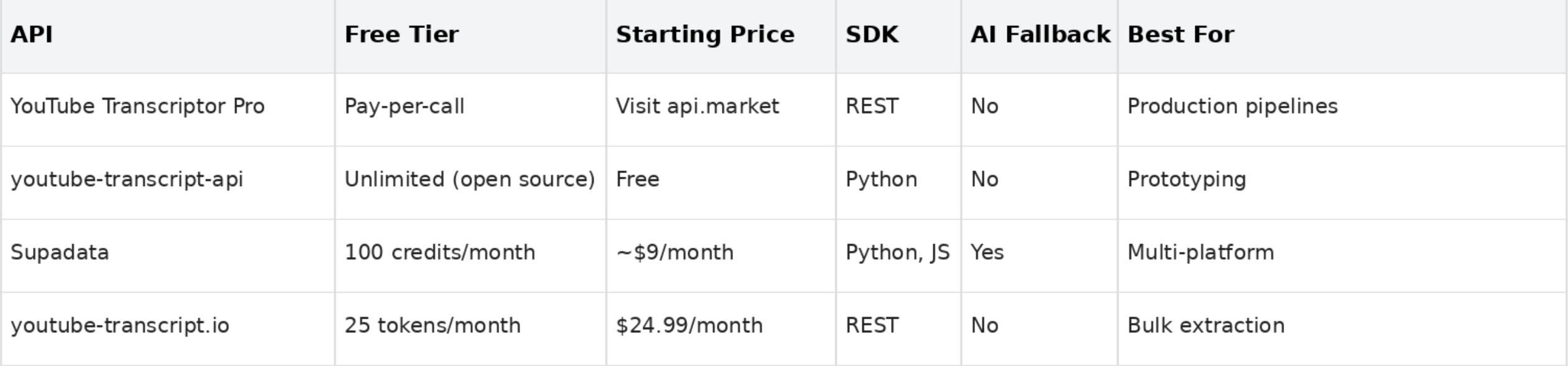
So you've seen all four. Not sure which one to pick? This table makes it easy.


Use Cases and Applications


1. Content Creation and Management


You've planned it, recorded it, edited it. And then it just sits there on YouTube, invisible to search engines. Transcripts fix that.


When you convert YouTube video to text, that same content becomes a blog post, a newsletter, or social media clips without starting from scratch. New video goes live, transcript gets pulled, draft lands in your CMS. No human in the loop required.


2. Accessibility Improvements


Not everyone in your audience watches with sound on. When there are no captions, those people get left out entirely.

Connect a transcript API, run it across your content, and output clean subtitle files automatically.


For any platform with a large video library, that's the only realistic path to full accessibility coverage.


3. Video Analysis and SEO


YouTube videos don't get indexed by Google the way written content does. Publish a transcript alongside your video and you give search engines actual text to crawl and rank.


You can also pair a transcript API with an online video transcript generator tool to build a simple interface for non-technical teammates. They paste a link, they get the text. No code needed on their end.


Beyond SEO, transcript data powers sentiment analysis, keyword tracking, competitive research, and AI summarization pipelines. The text is the starting point. What you build on top is up to you.


How to Convert YouTube Video to Text using YouTube Transcriptor


This is one of the fastest setups you'll do. Account to working transcript call in under 10 minutes.


Step 1 - Create your API.market account


Go to api.market and sign up. Navigate to the YouTube Transcriptor Pro page, subscribe to a plan, and copy the API key from your dashboard.


Step 2 - Make your first POST request

curl -X POST https://yourdomain.com/api/yt-transcript \

  -H "x-api-key: YOUR_API_KEY" \

  -H "Content-Type: application/x-www-form-urlencoded" \

  -d "videoUrl=https://www.youtube.com/watch?v=YOUR_VIDEO_ID"


Swap in your API key and the video URL. That's the whole setup.


Step 3 - Read the response

{

  "data": "Full clean transcript text here",

  "raw": {

    "title": "Video title",

    "captions": [

      { "start": "0", "dur": "2.34", "text": "First spoken segment" },

      { "start": "2.34", "dur": "3.10", "text": "Second spoken segment" }

    ]

  }

}


The data field gives you clean plain text ready for publishing or indexing. The raw.captions array gives you timestamped segments for subtitle files or video player sync. Ah, make sense?


Step 4 - Plug it into your pipeline


Pipe data into an LLM for summarization, push it to your CMS as a draft, or use the captions array to generate a .srt file.

API.market only charges on successful 2XX responses. Failed calls and videos with no available transcript cost you nothing.


Frequently Asked Questions


1. What is the youtube-transcript-api?

It's a free, open-source Python library that fetches transcripts from YouTube videos using the video ID. No API key needed. Install with pip install youtube-transcript-api and you're ready to go.


2. Is there a free YouTube Transcript API?

Yes. youtube-transcript-api is fully free and open source. Supadata gives you 100 free credits per month. youtube-transcript.io includes 25 free tokens per month. YouTube Transcriptor Pro on API.market charges only per successful call with no upfront subscription.


3. How do I convert a YouTube video to text using an API?

Use YouTube Transcriptor Pro on API.market. One POST request with your video URL and API key gets you clean transcript text and timestamped captions. No library setup needed. Under 10 minutes from signup to first result.


4. What is the best YouTube Transcript API for production use?

YouTube Transcriptor Pro on API.market for simplicity and predictable billing. Supadata if you need AI fallback for videos without native captions. Both are stronger than open-source libraries for anything production-critical.


5. Can I extract subtitles from a YouTube video programmatically?

Yes. All four APIs here return both clean text and a timestamped captions array. You can use that array to generate .srt subtitle files or sync text to any video player.

ο»Ώ

6. What is a youtube video transcription api used for?

Content repurposing, SEO optimization, accessibility compliance, AI summarization, and competitive research. Any workflow that needs spoken video content turned into structured text can use one.

Top YouTube Transcript APIs in 2026 That Deliver Reliable and Consistent Results

Here are the top YouTube Transcript APIs you can use in 2026: 1. YouTube Transcriptor by API Market 2.Youtube-transcript-api 3.Supadata Youtube Transcript...
Top YouTube Transcript APIs in 2026 That Deliver Reliable and Consistent Results

You've got YouTube videos and you need the text out of them. You want a youtube transcript api that holds up in production, not one that breaks the moment YouTube updates something internally.

Some tools are free but fragile. Others are priced like they think you're running Google. This guide covers the four best options in 2026 so you can stop comparing and just pick the one that fits.


What is a YouTube Transcript API?

A YouTube Transcript API pulls the spoken text out of any YouTube video and returns it as structured data your code can use.

You send a video URL or ID to an endpoint and get back clean readable text, sometimes with a full timestamped breakdown of every spoken segment.

It works with both manually added captions and YouTube's auto-generated ones. So even for videos where the creator never bothered adding subtitles, you can often still pull a full transcript.

How Does It Work?

YouTube stores caption data for most public videos. When auto-captioning runs or a creator uploads a subtitle file, that data lives inside YouTube's internal systems.

A transcript API taps into that data. You pass the video URL with an API key and get back a JSON response with clean text and raw timestamped captions.

Some APIs like Supadata also add an AI layer. If YouTube's native captions don't exist, the AI generates a transcript anyway. For production pipelines on large video libraries, you know that kind of fallback makes a real difference.

Top YouTube Transcript APIs for 2026

1. YouTube Transcriptor Pro by API Market

Start here if you want something that just works. No library installs, no dependency management, no worrying about YouTube changing something internally overnight.

YouTube Transcriptor Pro on API.market takes a video URL and gives you back the full transcript as clean text, plus timestamped caption segments. One endpoint. One API key. One POST request.

What makes it stand out is the billing model. You only get charged when the API returns a successful response. If the call fails or the video has no transcript, nothing gets deducted.

Features:

  • Single POST endpoint (/api/yt-transcript)
  • Returns clean plain text and raw timestamped captions in one response
  • Works with any public YouTube video URL
  • No scraping, no headless browser, no complex configuration
  • API key authentication via x-api-key header
  • Pay only for successful 2XX responses

Pricing:

API.market uses a pay-per-successful-call model. Visit the YouTube Transcriptor Pro page for current plan details.

Ideal for: Developers building AI tools, content repurposing apps, or SEO pipelines that need reliable video-to-text output in production.

2. youtube-transcript-api (Python)

This is the community favourite. Free, open source, and the most searched library in this space by a wide margin.

Run pip install youtube-transcript-api, pass a video ID, and get back caption objects with text, start time, and duration. Current version is 1.2.4, released January 2026, supporting Python 3.8 through 3.14.

Features:

  • Completely free and open source (MIT License)
  • Fetches both manually created and auto-generated captions
  • Multi-language support with fallback options
  • No API key required
  • CLI and Python API interface both available
  • Proxy support for working around IP-based blocks

Pricing:

Free. Open source under the MIT License with no usage limits.

Ideal for: Python developers prototyping a transcript feature and researchers who want to extract subtitles from YouTube videos without paying for a service.

This library relies on undocumented YouTube internals and has broken before when YouTube changed something on their end. For anything production-critical, a managed REST API is a safer long-term bet.

3. Supadata YouTube Transcript API

Supadata is the option you reach for when single-video pulls aren't enough. You can process full playlists, entire channels, and platforms beyond just YouTube.

The AI fallback is what sets it apart. If a video has no native captions, Supadata generates a transcript using its own AI model. No more pipelines hitting a wall because 20% of your queue has no captions.

Features:

  • Multi-language support with language code parameter
  • Timestamped segments on all transcripts
  • Python and JavaScript SDKs
  • AI-generated transcript fallback when native captions are missing
  • Native integrations with Zapier, Make, and n8n
  • Batch processing across playlists and channels

Pricing:

  • Free : 100 credits
  • Starter : ~500 credits from ~$9/month
  • Pro+ β€” Higher volumes, up to $297/month

Ideal for: Teams building multi-platform content pipelines and developers who need AI-backed transcription when YouTube captions aren't available.

4. youtube-transcript.io API

This is a dedicated REST API built specifically for YouTube transcript extraction. It works across any language that can make an HTTP request, so you're not locked into Python.

The channels endpoint is the standout feature. On Plus and Pro plans, you can pull transcript data across an entire YouTube channel in one go. Genuinely useful for competitive research and content audits at scale.

Features:

  • POST endpoint at https://www.youtube-transcript.io/api/transcripts
  • Channels endpoint for bulk processing (Plus and Pro plans)
  • Rate limit: 5 requests per 10 seconds
  • Basic auth with API token
  • Integrates with 400+ apps through n8n automation
  • Handles both auto-generated and manually created captions

Pricing:

  • Free: 1,000 transcripts @ $9.99/month
  • Pro: 3,000 transcripts @ $24.99/month
  • Pro+: 6,000 transcripts @ $47.99/month
  • Pro Max: 10,000 transcripts @ $79.99/month
  • Custom: 10,000+ transcripts @ Contact for pricing

Ideal for: Developers who want a REST API without Python lock-in and teams doing bulk channel-level extraction.

Comparison at a Glance

So you've seen all four. Not sure which one to pick? This table makes it easy.

Use Cases and Applications

1. Content Creation and Management

You've planned it, recorded it, edited it. And then it just sits there on YouTube, invisible to search engines. Transcripts fix that.

When you convert YouTube video to text, that same content becomes a blog post, a newsletter, or social media clips without starting from scratch. New video goes live, transcript gets pulled, draft lands in your CMS. No human in the loop required.


2. Accessibility Improvements

Not everyone in your audience watches with sound on. When there are no captions, those people get left out entirely.

Connect a transcript API, run it across your content, and output clean subtitle files automatically.

For any platform with a large video library, that's the only realistic path to full accessibility coverage.

3. Video Analysis and SEO

YouTube videos don't get indexed by Google the way written content does. Publish a transcript alongside your video and you give search engines actual text to crawl and rank.

You can also pair a transcript API with an online video transcript generator tool to build a simple interface for non-technical teammates. They paste a link, they get the text. No code needed on their end.

Beyond SEO, transcript data powers sentiment analysis, keyword tracking, competitive research, and AI summarization pipelines. The text is the starting point. What you build on top is up to you.

How to Convert YouTube Video to Text using YouTube Transcriptor

This is one of the fastest setups you'll do. Account to working transcript call in under 10 minutes.

Step 1 - Create your API.market account

Go to api.market and sign up. Navigate to the YouTube Transcriptor Pro page, subscribe to a plan, and copy the API key from your dashboard.

Step 2 - Make your first POST request

curl -X POST https://yourdomain.com/api/yt-transcript \

  -H "x-api-key: YOUR_API_KEY" \

  -H "Content-Type: application/x-www-form-urlencoded" \

  -d "videoUrl=https://www.youtube.com/watch?v=YOUR_VIDEO_ID"

Swap in your API key and the video URL. That's the whole setup.

Step 3 - Read the response

{

  "data": "Full clean transcript text here",

  "raw": {

    "title": "Video title",

    "captions": [

      { "start": "0", "dur": "2.34", "text": "First spoken segment" },

      { "start": "2.34", "dur": "3.10", "text": "Second spoken segment" }

    ]

  }

}

The data field gives you clean plain text ready for publishing or indexing. The raw.captions array gives you timestamped segments for subtitle files or video player sync. Ah, make sense?

Step 4 - Plug it into your pipeline

Pipe data into an LLM for summarization, push it to your CMS as a draft, or use the captions array to generate a .srt file.

API.market only charges on successful 2XX responses. Failed calls and videos with no available transcript cost you nothing.


Frequently Asked Questions


1. What is the youtube-transcript-api?

It's a free, open-source Python library that fetches transcripts from YouTube videos using the video ID. No API key needed. Install with pip install youtube-transcript-api and you're ready to go.

2. Is there a free YouTube Transcript API?

Yes. youtube-transcript-api is fully free and open source. Supadata gives you 100 free credits per month. youtube-transcript.io includes 25 free tokens per month. YouTube Transcriptor Pro on API.market charges only per successful call with no upfront subscription.

3. How do I convert a YouTube video to text using an API?

Use YouTube Transcriptor Pro on API.market. One POST request with your video URL and API key gets you clean transcript text and timestamped captions. No library setup needed. Under 10 minutes from signup to first result.

4. What is the best YouTube Transcript API for production use?

YouTube Transcriptor Pro on API.market for simplicity and predictable billing. Supadata if you need AI fallback for videos without native captions. Both are stronger than open-source libraries for anything production-critical.

5. Can I extract subtitles from a YouTube video programmatically?

Yes. All four APIs here return both clean text and a timestamped captions array. You can use that array to generate .srt subtitle files or sync text to any video player.

ο»Ώ

6. What is a youtube video transcription api used for?

Content repurposing, SEO optimization, accessibility compliance, AI summarization, and competitive research. Any workflow that needs spoken video content turned into structured text can use one.